Audio characteristics and algorithms
-
The ideal algorithm for each track– Choosing from different algorithms to let your creativity flow – and to obtain perfect sound quality. Shown here: Melodyne 5 studio, smaller editions may differ.

For the display and editing of different types of audio material, Melodyne employs different algorithms. Here, we outline which algorithms are available and for which types of audio material each is used.
The detection process
Melodyne analyzes the audio material to find the notes it contains and offer them to you for editing. We call this process “detection”.
In the course of the detection process, Melodyne itself takes a view as to what kind of material it is confronted with and decides which algorithm to use for the display and playback of the notes. You can tell which algorithm is selected at any given time by the check mark in the Algorithm menu as well as by the blobs in the Note Editor. Please bear in mind, however, that the detection process – in particular in the case of polyphonic audio material – cannot, for reasons that have to do with immutable principles, always deliver perfect results. Since a musically correct analysis of the recorded material is the most important precondition for efficient editing and convincing acoustic results, we recommend you to check the results of the detection systematically and make whatever corrections in Note Assignment Mode are necessary.
A brief overview: Which algorithm for which type of material?
To obtain the most suitable and detailed editing possibilities, for the following sound sources, the following algorithms are generally used:
- Singing, speech, saxophone, flute, monophonic bass etc.: "Melodic"
- Drum and percussion sounds or loops, and other percussive sounds with no significant pitched components: "Percussive"
- 808-kicks and -toms, tabla and similar percussive sounds with a pitched component: "Percussive Pitched"
- Pianos, strings, organs, guitars and other instruments capable of sounding more than one note at a time, where you wish to edit individual notes: "Polyphonic Decay" or "Polyphonic Sustain" (depending upon their sound or the playing techniques employed e.g. in the case of strings: pizzicato or legato)
- Rhythm guitars (funky guitars or distorted riffs and similar sounds), where you only wish to time-stretch or transpose them and no access to individual notes is required: "Universal"
- Loops featuring multiple instruments, or complete mixes, that you wish to time-stretch, quantize or transpose: "Universal"
- Experimental sound design (regardless of the original sound source): potentially any algorithm with extreme settings but primarily "Polyphonic Decay" or "Polyphonic Sustain"
The Universal algorithm
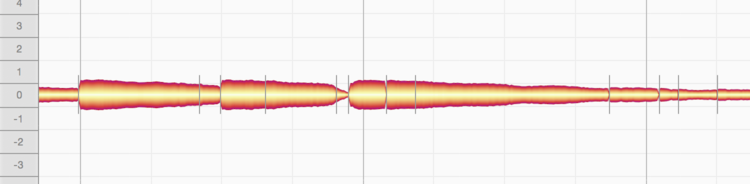
The Universal algorithm is particularly suitable for complex signals containing both percussive and tonal elements. If, for example, you wish to alter the pitch, timing or tempo of an entire piece of music, this algorithm will deliver the best sound quality.
The Universal algorithm, like the Percussive one, displays all the detected notes at the same pitch. The Pitch Ruler displays no note names, merely relative values for the semitones, and the scale functions are deactivated. The Universal algorithm completes the detection process very quickly and also consumes far fewer resources than the Polyphonic algorithm. It represents a good choice, therefore for recordings of individual instruments of all kinds that you intend simply to speed up, slow down or transpose. Tracks, in other words, for which you do not need bells and whistles such as DNA or Melodyne’s scale functions. Please note that with files that have been detected using the Universal Algorithm, the Attack Speed Tool cannot be used. Attack speed handles will therefore not be displayed for the corresponding blobs and the Attack Speed field in the Note Inspector will be grayed out. Please note that “Universal” is never used automatically for the detection; it must be selected manually if required.
The “Percussive” algorithms
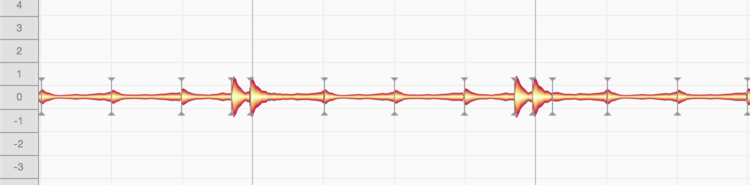
The "Percussive" algorithms are suitable for recordings of drums and other percussion instruments but also noise and atmospheric effects as well as other material in which Melodyne cannot detect any clear pitch in the sounds. In this case, successive drum strokes (for example) are distinguished, but they are all displayed at the same pitch. The blobs can still be raised or lowered, however the Pitch Ruler does not display the names of any notes but simply relative values in semitones. The scale functions are deactivated.
Some percussion instruments, however, do have what can be understood as a melodic capability, in that many of their sounds have a perceived pitch. Certain 808 kick drums, for example, are clearly tuned to the bass. The berimbau, too, for all the percussive character of its sound, plays recognizable melodies – as does the tabla. It is for such instruments – instruments that are in fact percussive yet still somehow also melodic – that the "Percussive Pitched" algorithm is intended. Here the detected sounds are separated and assigned to individual pitches. This makes it easy to adjust the tuning of an 808 kick drum, berimbau or tabla to the piece of music in question.
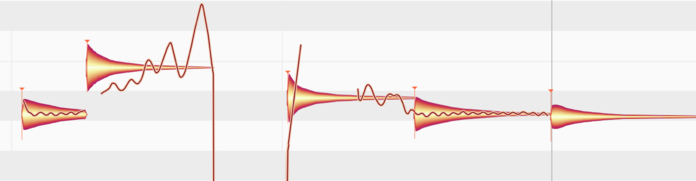
Whilst the Percussive and Universal algorithms are similar in terms of the way the blobs are handled and displayed – just as the Percussive Pitched and Melodic algorithms seem similar at first sight – the two percussive algorithms in fact operate in a different way internally from their optical “twins”, as they are optimized for various aspects of percussive sounds and consequently deliver their most convincing sound quality when dealing with material of a predominantly percussive nature. When dealing with non-percussive sources, however, such as the human voice, guitars, pianos and so forth, they are at a distinct disadvantage compared with the other algorithms, which are optimized for sounds with a distinct pitch.
In case of doubt – with instruments seeming to fall (or perhaps alternate) between the stools “percussive” and “melodic” – the best policy is to try each algorithm in turn.
Another distinctive feature of the “Percussive Pitched” algorithm, which it shares only with the “Melodic” algorithm, is that Melodyne is able here to detect, display and permit the editing of sibilants. With the “Melodic” algorithm, however, this happens automatically, whereas with the “Percussive Pitched” algorithm, sibilant control is by default switched off. To switch it on, go to Note Assignment Mode and check “Sibilant Handling” in the Algorithm Inspector. You can learn more about this here.
The Melodic algorithm
Melodic material is monophonic, by which we mean it is such that only one note is ever sounding at any given instant. Please bear in mind, however, that reverberation can cause notes to overlap even in monophonic material, creating, in effect, a kind of polyphony. If melodic material is to be edited in Melodyne, therefore, you should aim for as clean and “dry” (reverberation-free) a recording as possible.
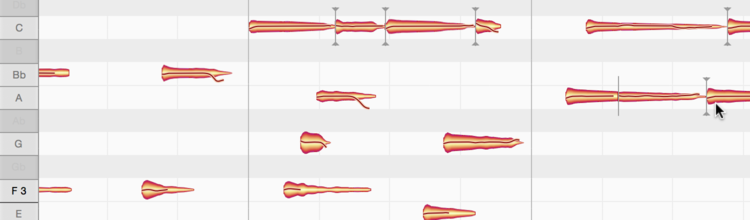
The blobs representing notes in melodic material are displayed at different pitches. Whether the blobs are isolated or joined to other blobs depends on the way they were played or sung: staccato or legato.
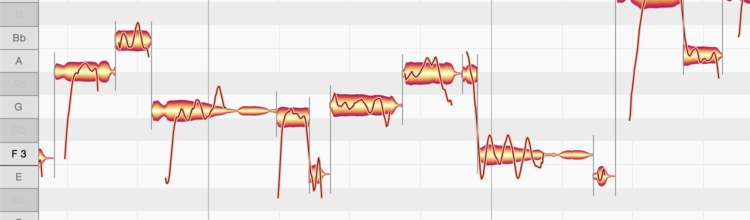
The “Melodic” algorithm is predestined for lead vocal tracks, as these are invariably monophonic; for there to be polyphony, there would have to be at least two singers. Furthermore, this algorithm takes into account the sibilants invariably heard in vocal parts. In the term ‘sibilants’, Melodyne includes not only consonants and digraphs such as “s” and “ch”, but also word fragments like “k” and “t” as well as the sound of the vocalist inhaling or exhaling between words.
Such sounds, which Melodyne identifies automatically and displays hatched, share one peculiarity in nature: There is no way singers can give them a particular pitch, so they remain unaffected by melodic changes. This behavior is preserved perfectly by Melodyne’s “Melodic” algorithm: Sibilants remain unaltered even when the word or syllable to which they belong is shifted upwards or downwards in pitch.
Let’s say the word is “sweet”, and we move the blob that represents the note in question upwards or downwards. Whilst the entire note will appear to move, acoustically this will not be the case as the “S” at the beginning and the “T” at the end will sound exactly the same after the pitch shift as they did before; only the “wee” in the middle will change pitch – in the direction, and by the amount, of the blob movement.
When editing timing, too, you will notice that the sibilants (indicated by the hatching) are never unnaturally squeezed or stretched.
This intelligent treatment of sibilants is vital to achieving natural-sounding correction of intonation and timing. Melodyne even takes into account the borderline cases that occur in nature, where sibilants and pitched components are heard simultaneously (rather than successively, as was the case earlier with the word “sweet”).
In Note Assignment Mode, you can edit the results of the detection and (if need be) alter the length of the sibilants detected or deactivate sibilant detection for an audio file in the Algorithm Inspector.
The “Polyphonic” algorithms
In Melodyne, thanks to DNA Direct Note Access, notes can be detected and edited within recordings even of polyphonic instruments such as the piano or guitar – including the individual notes of which chords are composed. When the Polyphonic algorithm is used, the blobs are displayed in a similar manner to those of monophonic material, with the obvious difference that the blobs are stacked vertically (at their respective pitches) whenever a chord or harmonic interval sounds.
There are two versions of the Polyphonic algorithm.
- Polyphonic Sustain is suitable for a wide range of polyphonic audio material in which the start of each note does not differ significantly from the rest, as is the case with string instruments played legato and organ music.
- Polyphonic Decay is a variation of that algorithm designed for instruments or playing techniques where the start of each note is markedly different from what follows, examples being string instruments played pizzicato, guitars and pianos.
Please note that DNA is intended for polyphonic instruments recorded singly, as it separates notes by pitch – not by instrument. This means that if you were to record two different instruments on the same track, whenever they played the same note, a ‘single’ blob would appear (representing the combined sound of both instruments) rather than a separate blob for each instrument playing the note.
Switching algorithms
You can at any time select a different algorithm to that chosen automatically for you by Melodyne. You might want to do this, for example, if you find that the material has not been interpreted in a way that suits your editing needs. To do this, while playback is halted, select the algorithm you prefer from the Algorithm menu. Melodyne will reinterpret the material in the light of your choice and adjust the display accordingly.
Note: when you do this, any editing of the same track performed prior to switching algorithms, including any copying of notes, will be lost (copied notes on other tracks are retained) . The right time to decide which algorithm you wish to use, therefore, is before you begin editing.
In the plug-in implementation of Melodyne, the choice of algorithm applies per transfer, whereas in the stand-alone implementation and an ARA DAW, it applies per audio file in the document being edited – collectively, we describe all such material as ‘audio sources’. Before you can change the algorithm applied to a particular audio source, you must first select one or more notes belonging exclusively to it. If you have selected no notes, or notes from two different audio sources, the Algorithm menu will be grayed out. In such cases, reduce your selection to notes belonging to one audio source only and it will be possible to switch algorithms.
A special feature of the stand-alone implementation: When you switch algorithms, triggering a fresh detection, Melodyne looks at the status of the Auto Stretch switch: if the Auto Stretch function is activated, once the new detection is complete, the tempo of the file will also be adjusted: if Auto Stretch is not selected, the original tempo of the file will be retained.
NB: There is some audio material that cannot be detected using the polyphonic algorithms because it contains too few tonal components. If in the case of such material you have chosen one of the polyphonic algorithms as the default (see below), the polyphonic detection process will be interrupted and a fresh detection of the material using the Percussive Algorithm, which is better suited to it, will commence. If you wish in such cases, when this detection is complete, you can still switch to Universal or Melodic.
Automatic or manual algorithm selection
By default, Melodyne makes its own determination, based on the characteristics of the sound, as to which is the best algorithm to apply, distinguishing between three types of material:
- Percussive material, in which case the “Percussive” algorithm is selected.
- Monophonic melodic material, in which case the “Melodic” algorithm is selected.
- Polyphonic material, in which case the “Polyphonic Sustain” algorithm is selected.
This default behavior is overridden, however, if you are using files in Melodyne for which you have already saved additional information regarding the algorithm and note detection. (From Note Assignment mode in the stand-alone implementation of Melodyne, it is possible to store this type of assignment data in an audio file.)
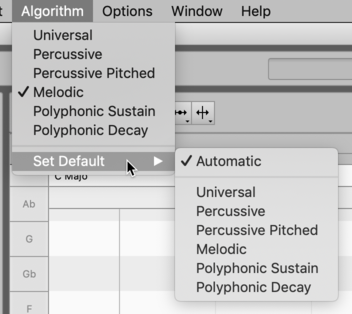
Do not forget, however, when you no longer need to impose your choice of algorithm on Melodyne, to restore Automatic as the default setting. Otherwise, since Melodyne remembers your default selection even after you have quit the program, you might be surprised to discover when the program is next launched that your vocals have been interpreted as percussive.
You will find further tips on working with these algorithms in the Melodyne Training section.